

Author
Vio TeamPublished
2 mins readOrders are where everything comes together: a customer, the products they bought, shipping details, and payment. This is the heart of your back office — and in Vio it’s a single form.
Before you start, make sure the customer already exists in your workspace, since orders are attached to an existing record.
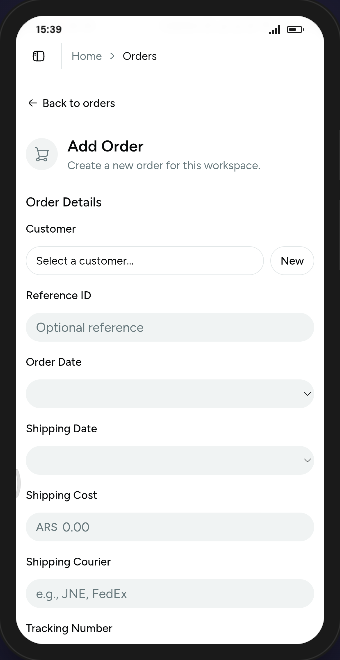 The Add Order form links a customer, line items, and shipping in one place.
Create an order step by step
- Open Orders in your workspace and click the + button.
- Pick the Customer with the searchable picker. Need someone new? Use the New action to add them without losing your progress.
- Set the order date and add a Reference ID if you need your own numbering.
- Add items: search for a product, and Vio fills in its name and price. Adjust quantity and price as needed.
- Add a discount and shipping cost if applicable.
- Fill in shipping details — date, courier, and tracking number — and choose your billing and shipping addresses.
- Save, and the order appears at the top of your list.
When you select a customer, Vio loads their saved addresses, and their default address fills in the billing and shipping fields automatically — one less thing to type.
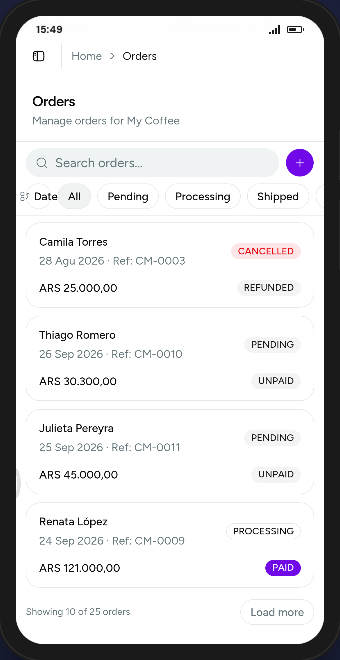 The order list tracks status and payment at a glance, from pending and unpaid through to delivered and paid.
A few things worth knowing
- Once an order exists, you can update its status (pending, processing, shipped, delivered, cancelled) and payment (paid, unpaid, refunded) from the edit view.
- Orders are filterable by status and searchable, so finding a specific order stays fast.
- Item and customer pickers show human-readable identifiers — customer reference IDs and product SKUs — instead of internal IDs.
Ready to take your first order?
Add a customer, pick a product, and create an order end to end.
Leave a Reply
Fill all fields so we can get some info about you. We'll never send you spamRelated Posts
Explore more articles that dive deeper into tips, trends, and strategies to help you get the most out of Vio and beyond.


0 Comments
Join the conversation