

An effective daily sales recap = one fixed hour each evening + seven columns: date, order number, product, quantity, revenue, payment status, notes. Weekly totals come out of a single SUMIFS per week — not from reopening every invoice one by one. The secret isn’t elegant formulas; it’s that every order gets recorded the same day, because no recap can fix data that never made it in.
This article is the 10-minute version of the recap ritual: a minimal column structure, the formulas people actually use, the step-by-step evening routine, and how to move this from “if I have time later” to “done before I close my laptop”.
Why daily recaps beat monthly ones
A monthly recap answers questions that are no longer fixable: “where did we lose money last month?”. A daily recap answers the ones still salvageable:
- Leaks get caught tonight, not at month’s end. An order that missed follow-up yesterday still has a price today. A week-old unpaid invoice is still collectible; a three-month-old one is a lost pearl.
- Cash flow becomes visible. Money that is “already sold but not yet received” is a status, not a feeling. Daily recaps separate revenue from collected payments — two numbers often mistaken for one.
- Recording errors rot fast. Memory of order details lasts hours. Postponing the recap means correcting from recall instead of from records.
- A baseline for decisions. Restock? Raise prices? Evaluate an admin? All need consistent daily data — at least 2–4 weeks of it to be a meaningful comparison.
One small ritual beats one big spreadsheet nobody opens.
The minimal column structure: seven columns, no more
A recap that survives is one a lazy person can still fill. One row per order:
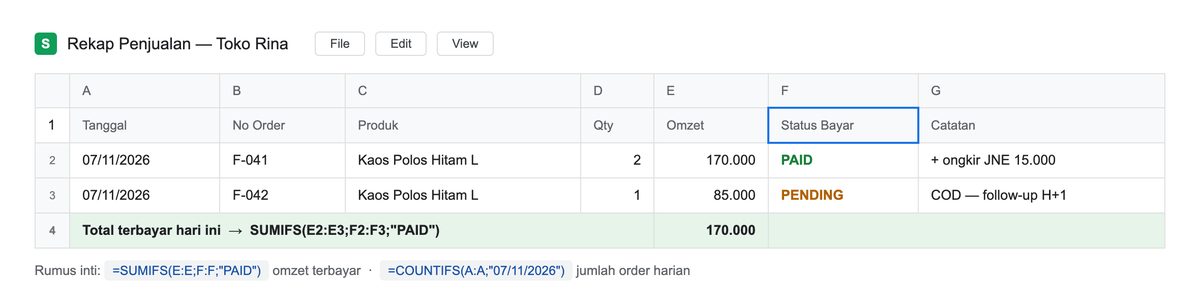 Illustration: seven columns + one totals row. Everything a daily recap needs lives here.
| Column | Contents | Why it’s mandatory |
|---|---|---|
| Date | day the order came in | the axis of all analysis |
| Order no | unique code (F-041, etc.) | the paper trail for disputes |
| Product | item name (or top item) | see what actually moves |
| Qty | unit count | stock vs records |
| Revenue | order value | gross — not yet necessarily cash |
| Payment status | PAID / PENDING / UNPAID | separates selling from billing |
| Notes | shipping, COD, follow-ups | where “I’ll remember later” goes to die |
Extra columns (buyer name, courier, discounts) may follow — only if you actually reread them. Overweight structures are the most common reason recaps die in week three.
The only sales report formulas you need
From that seven-column table, four numbers come out of four formulas:
Collected revenue today   =SUMIFS(E:E;A:A;"11/08/2026";F:F;"PAID")
Still outstanding         =SUMIFS(E:E;F:F;"PENDING")
Orders per day            =COUNTIFS(A:A;"11/08/2026")
Top product this week     =SUMIFS(E:E;C:C;"Black Plain Tee L";A:A;">="11/02/2026")
No pivot tables, no macros. These four answer “what did we sell today, what’s unpaid, how many orders, what sells best” — which is exactly the simple sales report most people mean when they search for how to make a sales report.
The 10-minute routine: every evening, in this order
The deciding part isn’t the formula — it’s the hour. Fix one time (usually after the last order window closes) and run five steps:
- Count what came in (2 min). Open today’s order/chat list; count how many orders should be recorded. The source must be one place — see how to record WhatsApp orders if yours is scattered.
- Match against what’s recorded (3 min). Orders today vs recap rows. Unequal numbers = a leak, and tonight you can still plug it. This is the direct cure for admin mistake #7 — never recapping, therefore never knowing.
- Update payment statuses (2 min). PENDING rows that got paid → PAID. PAID rows shipped → check dispatch. Statuses are part of the recap, not admin that can wait — tracking them is covered in sending invoices and tracking payments.
- Flag what’s overdue (2 min). Any PENDING older than one day joins tomorrow’s collection list. Note the last reminder date in the Notes column.
- Write one totals row (1 min). Collected + outstanding for today. After a month you’ll have 30 summary lines — that is your monthly report, just summed.
Total: ten minutes. What creates overtime isn’t the recap — it’s the skipped nights, whose bill arrives at month’s end.
Recapping across admins: one source of truth, not many spreadsheets
Two admins = two memories = two recaps that never match. The rules are simple but firm:
- One file / one system for everyone. Personal recap sheets on each admin’s phone aren’t shop records — they’re private archives nobody reads during reconciliation.
- Every row has an owner. A small “admin” column costs less than the “that wasn’t my typo” drama. Separating people from channels, as in admin mistake #4, is the prerequisite.
- The evening recap belongs to one person, not a rotation. Rotating without a uniform ritual produces data quality that waves up and down with whoever’s holding the pen.
If this sounds heavy to run in a shared spreadsheet — that’s honest: the cost isn’t in the tool, it’s in the synchronization discipline.
The no-spreadsheet version: just ask
There’s a more humane shortcut than the 10-minute routine: stop writing the recap yourself — make sure orders are recorded from the start, and let the recap be a by-product.
The principle is identical to the spreadsheet: one source of truth, filled the same day. The difference is that recording and calculating aren’t your hands anymore.
Start where the data lands — the order list with payment statuses and dates, already structured:
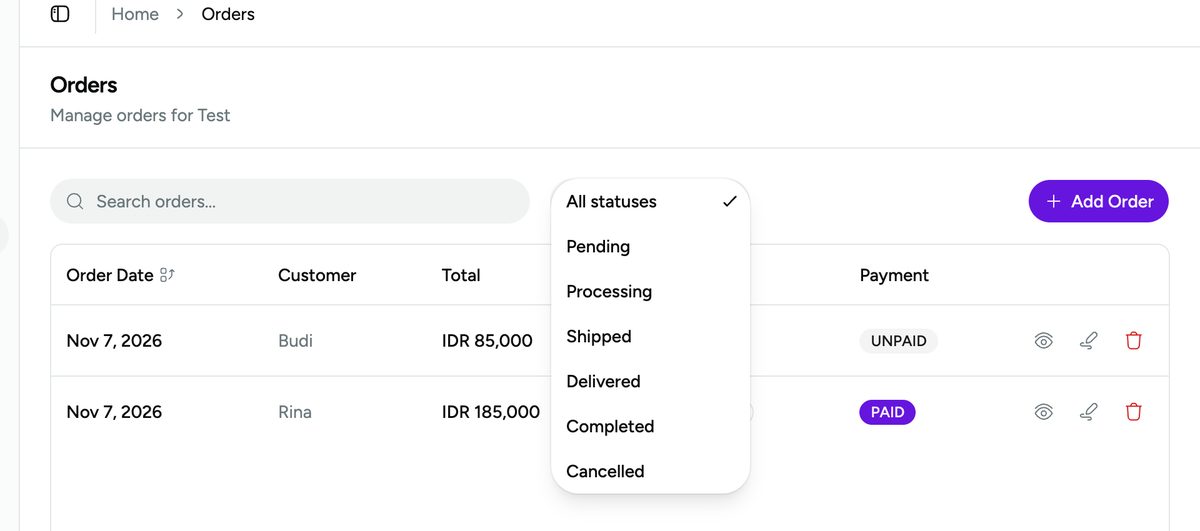 Every order carries a date, total, and payment status from the moment it’s logged — the recap becomes arithmetic, not archaeology.
Then, instead of computing, ask. One sentence, one report:
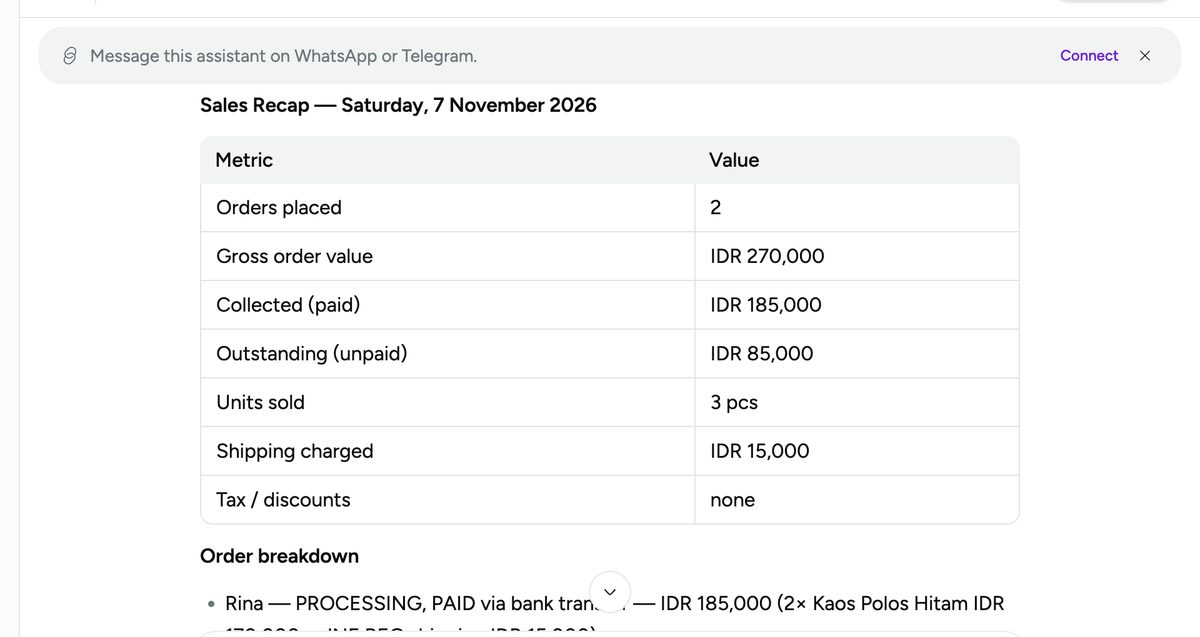 The same recap that used to need 10 minutes + four formulas is now one question: order totals, gross, paid vs outstanding — even the follow-ups worth chasing.
And for trends, the analytics page assembles the numbers itself — revenue, COGS, margin, and the pipeline of not-yet-paid orders:
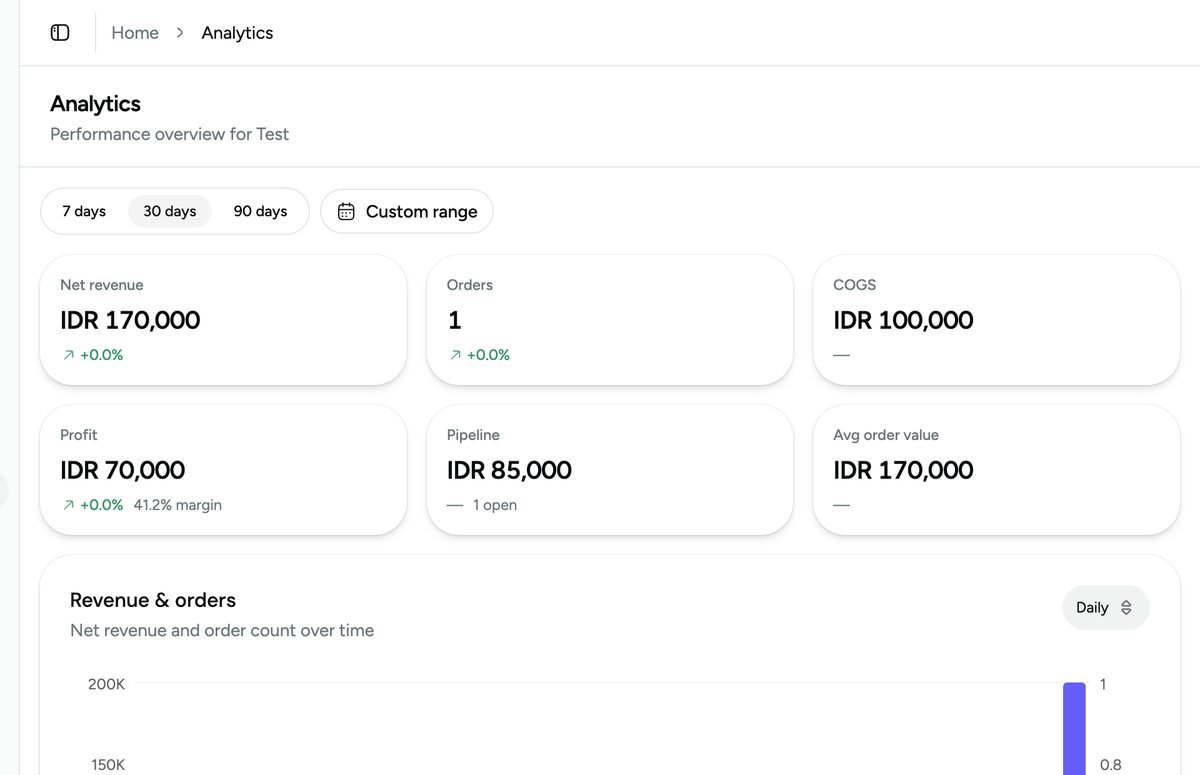 The same figures, read as trends. One honest caveat: only what was logged counts — analytics can’t backfill the nights you skipped.
It’s not magic and not exaggerated marketing: it’s simply the consequence of moving the routine’s first two steps (record + reconcile) into the system — orders become statused records via how to create an order in Vio, and recaps just fall out. What remains is the part that needs a human: chasing the unpaid ones, and deciding with the numbers.
Frequently asked questions
Daily vs monthly sales recap — which matters?
Both, but not in reverse order. Monthly reports are built from consistent dailies; a recap assembled only at month-end is archaeology, not reporting. Build the daily habit for 2–4 weeks and the monthly report becomes one sum formula.
Which Excel formulas should I actually learn for sales recaps?
For a single order table: SUMIFS (conditional totals — revenue by payment status and date) and COUNTIFS (orders per day). Those two cover 90% of a small shop’s needs. Pivot tables earn their keep only once your column structure has been stable for months.
My shop is still small — do I need a daily recap too?
Small volume is exactly when to build the habit before volume makes it mandatory. At 5 orders a day a recap takes 3 minutes; at 50 it’s the only thing keeping you in control. Systems aren’t built during emergencies.
Summary: the daily sales recap without overtime
- Seven columns, one row per order, recorded the same day.
- Four formulas suffice: collected
SUMIFS, outstandingSUMIFS, dailyCOUNTIFS, per-productSUMIFS. - Fixed-hour routine: reconcile → update statuses → queue collections → write totals. Ten minutes.
- Multiple admins need one source of truth, not one spreadsheet each.
- Want it lighter: ensure orders get logged, then ask for the recap — one chat sentence, or open the analytics page.
Try Vio free — orders get logged with payment status from the first chat, and the evening recap becomes a question you ask, not numbers you type.


0 Comments
Join the conversation